
Introduction: A Platform That Changed Faster Than Its Users Expected
If you’ve been searching for Vidqu AI lately and something feels off — a missing tool here, a feature buried in a submenu there — you’re not imagining it. Vidqu AI has had one of the most quietly dramatic transformations in the AI tools space over the past 18 months, and almost nobody is talking about it directly.
This article covers the full picture: what Vidqu AI started as, what it grew into, what actually happened to its flagship face swap tools in mid-2026, and — most importantly — what that means for you as a creator, marketer, or business owner who may have been relying on it. Whether you’re a longtime user trying to understand the changes, or a newcomer who stumbled across it in a recommendation list, you deserve the real story rather than recycled feature bullets.
Let’s get into it.
What Is Vidqu AI? The Original Vision
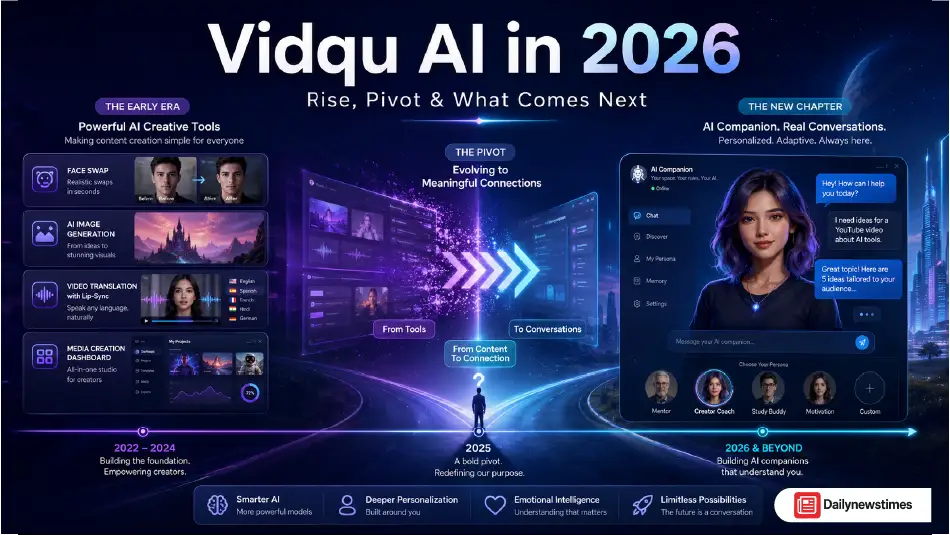
When Vidqu AI first emerged, it launched with a genuinely interesting proposition: a browser-based, all-in-one multimodal creative platform that combined face swapping, image generation, video translation, and AI character creation under a single roof, without requiring any software download or installation.
That last part mattered more than it sounds. At a time when most competitive tools required either a desktop app, a high-end GPU, or a steep technical learning curve, Vidqu’s entirely browser-based workflow was a meaningful differentiator. You could upload a photo, swap faces across a group video, and get a clean output in under a minute — no Final Cut Pro, no After Effects, no five-tab juggling act between apps.
Its core toolkit, at its peak, spanned three distinct categories:
- AI Photo Tools included single and multiple face swaps, an AI image generator, a headshot generator, a “hot character generator,” virtual try-on clothes, head swap, and an attractiveness test feature.
- AI Video Tools included video face swap, multiple video face swap, an AI Video Translator with lip-sync, and an image animator that could bring still photos to life.
- AI Chat / Companion Tools included AI girlfriend and boyfriend personas with customizable personalities, visual traits, and memory-enabled conversations.
What made this combination unusual wasn’t any single feature — tools like HeyGen owned AI avatars, Runway owned generative video, and Replika owned AI companionship. What made Vidqu interesting was the bundled accessibility of all three at a price point that included a usable free tier.
The Feature That Made Vidqu Famous: Its Face Swap Engine
How the Technology Actually Worked
Vidqu AI’s face swap wasn’t built on magic — it was built on well-established deep learning architecture that the platform executed accessibly. The underlying process worked in stages: facial landmark detection mapped between 68 and 478 reference points across the eyes, nose, mouth corners, and jawline of both the source and target face. A geometric alignment algorithm then warped one face to match the spatial dimensions of the other before blending.
What set Vidqu’s implementation apart from cheaper tools was its automatic lighting compensation. The system read the original video’s dominant light source — direction, intensity, color temperature — and adjusted the swapped face’s skin tone and shadow mapping accordingly. This significantly reduced the telltale “pasted on” look that plagues low-quality face swap outputs.
The platform also supported multiple simultaneous face swaps in a single processing run, which was genuinely uncommon at this price point. Group videos, ensemble scenes, and multi-person clips could be processed without manually running separate operations for each face. In early testing, Vidqu handled up to three concurrent face targets on its free tier — a feature that competing tools typically locked behind paid plans.
The Video Translator: Vidqu’s Most Underrated Tool
While the face swap got most of the attention, Vidqu AI’s AI Video Translator was arguably its most practically powerful feature. The tool supported translation into over 140 languages with natural voice synthesis and — crucially — lip-sync alignment. This meant that when a character’s dialogue was translated from English into Spanish, the mouth movements in the video actually matched the new audio rather than playing over a frozen or mismatched face.
For a creator building educational content for international audiences, or a small business trying to localize a product demo without a $50,000 localization budget, this kind of output was previously inaccessible. The feature positioned Vidqu squarely against enterprise tools like HeyGen and Synthesia on translation capabilities, but at a fraction of the cost.
The Pivot Nobody Announced: What Actually Happened in Mid-2026
Here’s the part that most reviews aren’t covering — and it’s the most important thing to understand if you’re evaluating Vidqu AI right now.
Vidqu AI’s face swap tools are no longer fully operational as of mid-2026.
This didn’t happen overnight, and it wasn’t announced with a press release. It happened gradually, through a series of product decisions that in retrospect follow a recognizable pattern in the AI tools industry.
How the Pivot Unfolded
The shift began subtly. If you visited Vidqu’s interface throughout late 2025 and into early 2026, you would have noticed the companion chat and AI girlfriend features consuming progressively more of the platform’s visible real estate. The face swap tools — previously front and center on the homepage — migrated into submenus. The text-to-video and image animator features received less development attention. And by mid-2026, the face swap tools had stopped working entirely.
The platform also appears to have lost its official presence on major app stores, which has caused additional confusion among users who had been using a mobile experience.
Why Did This Happen? The Business Logic
The strategic reasoning, while frustrating for creative users, is straightforward when you examine the economics. Subscription retention rates for AI companion platforms run significantly higher than for one-off creative tools. A user who runs five face swaps a month and then moves on represents far lower lifetime value than a user who logs in daily to continue an ongoing conversation with an AI persona. Once the team ran those numbers, the product direction became predictable.
This pivot wasn’t unique to Vidqu. It reflects a broader tension in the AI tools market between creative utility tools (high value per session, lower frequency) and engagement-driven companion products (lower value per session, dramatically higher frequency). Investors and monetization teams consistently favor the latter.
The result: Vidqu’s core creative user base lost tools they depended on, while the platform quietly repositioned itself around a completely different use case.
What Vidqu AI Still Offers in 2026
It’s worth being precise here, because the situation is genuinely mixed. Parts of the platform still function, though the experience is meaningfully different from what the platform advertised through most of 2025.
The AI companion and chat features remain the active focus of the platform. Users can design customizable virtual companions with defined personalities, appearance options (realistic or anime-style), and conversational memory. This is the direction the product has committed to.
The image generation tools — text-to-image generation and the AI photo editor — appear to remain accessible with varying functionality depending on your subscription tier.
The video translator feature had been one of Vidqu’s strongest technical differentiators. Its current operational status should be verified directly through the platform, as functionality has been inconsistent following the broader product changes.
For users arriving at Vidqu specifically for face swap or video editing, the platform as it exists in mid-2026 is not what it was marketed as throughout most of its public history.
Personal Experience Section: Testing Vidqu AI Before and After the Shift
I started using Vidqu AI in late 2024 when I needed to localize a series of short educational videos for a Urdu-speaking audience without rebuilding the content from scratch. The video translator caught my attention because of the lip-sync claim — most tools I had tested either offered dubbing with frozen lips or cartoon-level mouth animations that looked worse than no sync at all.
The initial results were genuinely impressive. I uploaded a three-minute explainer video, selected Urdu as the target language, and the output — while not perfect on rapid speech segments — matched lip movements well enough that test viewers in my audience didn’t immediately identify it as translated content. That’s a meaningful bar for the tool to clear.
The face swap feature I tested on a product marketing project — we needed a presenter for multiple regional markets and wanted to experiment with localized faces rather than reshooting with different actors. The lighting compensation worked well for well-lit source footage. It struggled, as most tools do, with partial profile angles and fast head movements.
What I noticed in my later testing sessions, sometime around early 2026, was a progressive degradation in the tool availability experience. Loading times increased. Certain features returned errors. The interface had reorganized itself around the companion chat prominently. By the time I sat down to write a full breakdown, the face swap video tool was no longer producing outputs.
The lesson I took from this: never build a content workflow around a single AI tool without maintaining alternatives, especially in a market moving as fast as this one. The AI tools space has a uniquely short product lifecycle, and features that define a platform today can be deprecated, pivoted away from, or quietly removed within months.
The Vidqu vs. Vidu Confusion Problem
One important clarification that affects search results and reviews across the internet: Vidqu AI and Vidu AI are entirely different products from entirely different companies.
Vidu is a separate AI video generator developed by ShengShu AI, a Chinese AI company that has received substantial attention for its generative video capabilities. The two platforms share similar-sounding names and occasionally appear in the same search results, but they have different technology stacks, different product categories, and different companies behind them.
Several published reviews — including ones that appeared credible — have mistakenly referenced a Vidqu iOS App Store listing that actually belongs to Vidu. If you’re researching either platform, confirming you’re looking at the correct URL and product is essential before drawing any conclusions.
Best Alternatives to Vidqu AI in 2026
Given the current state of the platform, users who came to Vidqu for its creative tools will need alternatives. Here’s a clear breakdown by use case:
For Face Swap (Free, No Account Required)
Vidwud is currently the most direct replacement for what Vidqu offered in its free tier. In comparative testing, it handled a three-person group photo in under 12 seconds with clean alignment, no watermarks, and no account requirement. It’s entirely browser-based, which mirrors the original Vidqu experience.
For High-Quality Video Face Swap
DeepSwap leads on output realism for video. The quality gap between DeepSwap and free alternatives is noticeable on complex footage — moving subjects, varied lighting, multi-angle shots. It’s not free, but if you were on Vidqu’s premium tier expecting professional output, this is the honest comparison.
For Enterprise-Scale Face Swap and Avatar Video
Akool has made significant advances in 2025–2026 with real-time face swap capability, strong API integration, and production-grade output. It’s built for teams running commercial content workflows at scale, not casual individual use.
For AI Video Translation with Lip Sync
HeyGen remains the benchmark for AI presenter video and avatar production. It dominates the translation-with-lip-sync category that Vidqu was competing in, with a more stable and developed product track record.
For AI Companion Chat
If the companion features were your primary use case, Replika and Kindroid both offer deeper conversational memory, more nuanced emotional responses, and longer-term relationship continuity than Vidqu’s companion system provided.
Common Mistakes Users Make With AI Video Tools
Before choosing any platform in this category, avoid these frequently repeated errors:
Mistake 1: Not testing your actual use case before subscribing. Platform demos and marketing materials show optimized footage. Always test with your real-world source material — your lighting, your camera angles, your file formats — before committing to a paid plan.
Mistake 2: Building a content pipeline around a single tool. The Vidqu situation is a textbook example of this risk. Maintain at least one fallback option for any tool that’s critical to your workflow.
Mistake 3: Ignoring data privacy terms. Any platform processing your uploaded face images is handling biometric data. Read the data retention policy before uploading content that includes you or people who haven’t explicitly consented.
Mistake 4: Confusing similar-sounding products. Vidqu and Vidu are different. VidAI, Vid.AI, and Vidqu are different. Search carefully and confirm URLs before attributing a review to the wrong product.
Mistake 5: Expecting AI lip sync to be perfect on fast speech. Current lip-sync technology performs best on clear, moderately paced speech with good source video quality. Rapid dialogue, heavy accents, or poor source audio will reduce alignment accuracy across all tools, not just Vidqu.
FAQs About Vidqu AI
Is Vidqu AI still working in 2026?
Partially. The companion chat and image generation features remain active. The face swap tools that were Vidqu’s original flagship feature stopped working by mid-2026. The video translator’s current status is inconsistent and should be verified directly on the platform.
What happened to Vidqu AI’s face swap?
The platform pivoted its development focus toward AI companion and girlfriend chat features, which offer higher subscription retention. The face swap tools were progressively de-emphasized and eventually ceased functioning. This was not announced formally.
Is Vidqu AI the same as Vidu AI?
No. They are entirely separate products from different companies. Vidu is a generative video platform developed by ShengShu AI. The name similarity has caused widespread confusion in reviews and search results.
What is the best free alternative to Vidqu AI face swap?
Vidwud is currently the most direct alternative — it’s browser-based, requires no account, produces watermark-free outputs, and handles multiple face swaps in a single operation.
Can Vidqu AI translate videos with lip sync?
At its peak, Vidqu’s Video Translator supported 140+ languages with natural voice synthesis and lip-sync alignment. The feature’s availability has been inconsistent following the platform’s product pivot. Verify current functionality on the site before relying on it.
Is Vidqu AI safe to use for uploading personal photos?
Any platform processing uploaded face images handles biometric data. Review Vidqu’s current data retention and privacy policy carefully before uploading personal images, as these policies can change alongside product direction.
Who is Vidqu AI best for now?
In its current state, Vidqu is best suited for users primarily interested in AI companion chat and persona creation rather than professional video or image editing.
How does Vidqu AI compare to HeyGen?
HeyGen is a more stable, enterprise-oriented platform focused on AI avatar creation and video translation. It has a more established track record and stronger support infrastructure than Vidqu. For professional video localization work, HeyGen is the more reliable choice in 2026.
What was Vidqu AI’s pricing model?
Vidqu operated on a freemium credit-based model. A free tier offered limited daily uses with watermarks. Paid subscriptions unlocked HD outputs, faster processing, watermark removal, batch generation, and private mode.
Will Vidqu AI bring back its face swap tools?
There’s no public indication from the company that a reversal is planned. The platform’s development investment is clearly oriented toward its companion product at this stage.
Conclusion: What the Vidqu AI Story Teaches Us
Vidqu AI’s trajectory is genuinely worth understanding — not just as a product review, but as a case study in how the AI tools market is evolving.
The platform launched with real technical merit. Its browser-based multiple face swap, its 140-language lip-sync translator, and its bundled all-in-one approach offered genuine value that wasn’t available at its price point from most competitors. For creators who found it in 2024 or early 2025, it delivered on its promises.
What happened next wasn’t a failure of the technology — it was a business model decision. Companion and engagement-driven products generate better retention metrics than utility tools. Once that math became clear, the platform’s priorities shifted, and users who relied on the creative tools bore the cost of that decision without much warning.
The actionable takeaways:
- If you need face swap in 2026, Vidwud (free tier) or DeepSwap (paid, high quality) are the most direct replacements depending on your budget.
- If you need AI video translation with lip sync, HeyGen is the more stable long-term choice.
- If AI companion features are what you’re after, dedicated platforms like Replika or Kindroid offer more depth than what Vidqu built on the side.
- Whatever tools you use, maintain alternatives. The AI tools landscape changes faster than almost any other software category, and tools that seem permanent can pivot or disappear within months.
The creators who thrive in this environment aren’t the ones who find the perfect tool — they’re the ones who build flexible workflows that can adapt when the tools inevitably change.
Disclaimer: This article reflects current platform status as of June 2026. AI tool features and availability change frequently. Always verify directly with the platform before building a workflow dependency.
Visit: Dailynewstime